
Tiping Com Review: Typing Tests, Games, Features, and Safety
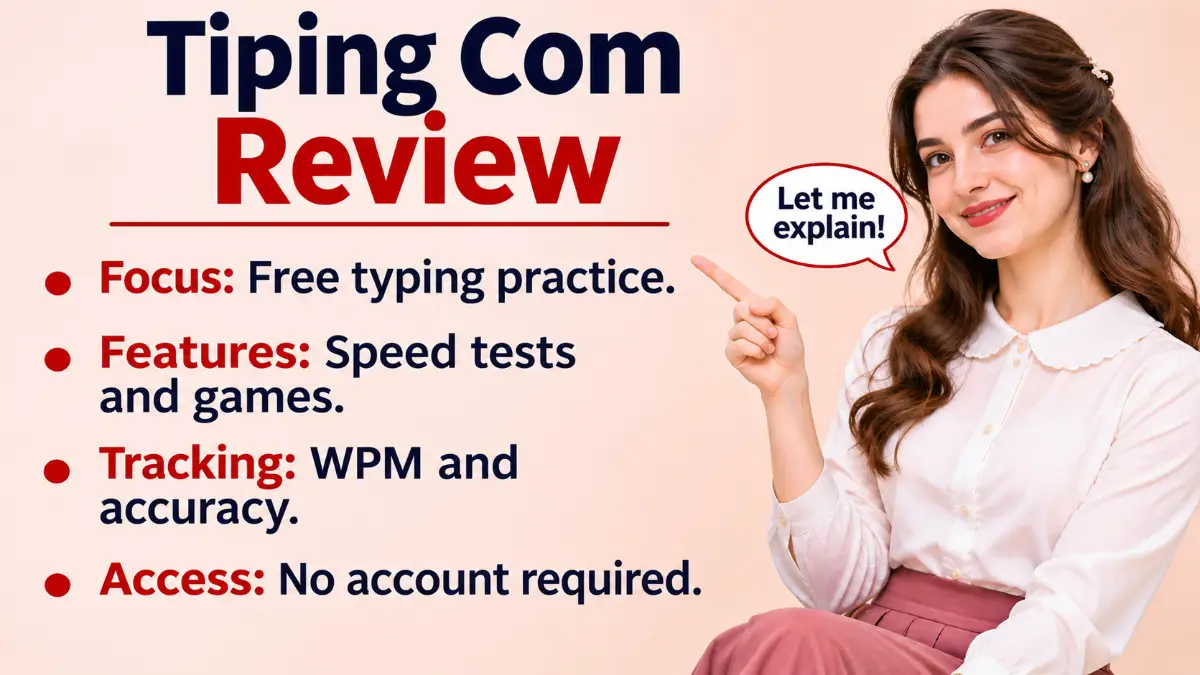
Tiping com is a free browser-based typing practice website at Tiping.com. It offers timed typing tests, words-per-minute (WPM) and accuracy measurements, typing games, daily challenges, a ghost race, weak-key drills, and personal statistics. The website says users can begin without creating an account and that their test history remains on their device. Importantly, Tiping.com and Typing.com are different websites. The first emphasizes quick tests and practice games, while the second offers a structured typing curriculum and classroom tools. This guide explains the features visible on Tiping.com’s official pages, how to choose a practice method, what its privacy claims mean, and where further verification is appropriate. It also includes practical advice for beginners and people preparing for typing assessments.
Related Post: Zingyzon Com
What Is Tiping Com?
Tiping.com is an online typing-speed and keyboard-practice service. Its homepage identifies the main test as a free typing test and says it measures speed, accuracy, and consistency. Rather than requiring a software installation, the service presents its tools in a browser.
The site offers more than a single speed test. Its navigation points to a daily challenge, typing games, ghost race, weak-key practice, statistics, and learning guides. These are useful distinctions because someone searching for “tiping com” might mistakenly expect a different educational website.
The website states that no account is required for its basic experience. That makes it appealing to users who want to take a quick test without entering an email address. Its pages also say progress is saved locally on the device, which has advantages for convenience but limits how reliably results travel between devices.
Who Might Benefit?
Students can use the tests to practice writing assignments more comfortably. Office workers may find them useful for improving everyday keyboard efficiency. Job applicants can rehearse typing under time pressure, although an employer’s actual assessment may use different text, timing, and scoring rules.
Casual players may prefer the games, while people who already type fairly well can use repeated tests and weak-key exercises to work on consistency. A beginner who needs detailed finger-by-finger lessons may want to pair Tiping.com with a structured course.
How Does Tiping Com Work?
The official homepage shows a typing test with selectable modes and time settings. The visible interface offers Time, Words, and Quote modes, as well as 15-, 30-, 60-, and 120-second choices for timed practice. It also displays punctuation and numbers controls.
Step 1: Open the Correct Website
Enter tiping.com in the address bar. Check the spelling carefully because adding the second “p” takes you to Typing.com, a separate service. The Tiping.com homepage identifies itself as TIPING and displays a free typing test.
Step 2: Choose a Test Mode
For a first attempt, use a timed test. Words and Quote modes appear as additional options, but their exact scoring behavior may differ from the timed mode. Beginners should start with familiar words before adding more demanding material.
Step 3: Select Your Settings
Choose a duration suited to your goal. The homepage also presents punctuation and numbers controls. Adding those elements can make the exercise more representative of office work, but may reduce your speed initially.
Step 4: Start Typing
The visible instructions say to tap the input area and begin typing. Try to keep your eyes on the displayed text instead of the keyboard. Avoid rushing so much that you introduce repeated errors.
Step 5: Review the Result
The site says its test reports WPM, accuracy, and consistency. Use those measures together: a fast score is less useful when you make many mistakes. Because a live test was not completed during this review, the exact results-screen layout was not independently assessed.
Step 6: Repeat Under Comparable Conditions
Use the same duration and similar difficulty when comparing your progress. Changing from simple words to punctuation-heavy quotes can affect your score even when your typing ability has not changed.
Main Features of Tiping Com
The site’s official pages describe several distinct practice tools. The descriptions below reflect the website’s published information, not a claim that every interactive mode was personally completed during research.
Typing Speed Tests
The main test measures how quickly users enter displayed text. Short tests are convenient for warming up, while longer tests offer a better picture of sustained performance. The interface’s time, words, and quote choices let users vary their practice rather than repeat one format indefinitely.
WPM, Accuracy, and Consistency
WPM estimates typing speed using a standardized word length. Accuracy indicates how reliably the entered text matches the prompt. Consistency helps users think about whether their pace stays steady or fluctuates across a session.
A useful practice target is to improve accuracy first, then gradually increase speed. Someone who types at a high rate but spends substantial time correcting mistakes may be less productive than a slower, more accurate typist.
Daily Challenge and Streaks
Tiping.com describes a daily challenge in which everyone receives the same test for that day. Its dedicated page identifies the challenge as a 60-second sprint and displays current and best streak counters. The shared format can motivate regular practice, although it should not be treated as a certified competition.
TIPING Race
The official games page describes TIPING Race as a 75-second sprint against three clearly labeled AI bots. Users can choose Easy, Medium, Hard, or Expert difficulty. The site specifically says these opponents are automated rather than real human players, an important distinction for anyone expecting live multiplayer competition.
Word Survival
In Word Survival, words approach a danger zone and the player types them before they arrive. The game description mentions three lives, increasing difficulty, combos, and power-ups such as Freeze, Shield, and Clear. This format can encourage quick recognition, though it does not replace careful sentence-level typing practice.
Ghost Race
Ghost Race lets users compare their current typing pace against a replay of their personal best or a pace bot, according to the homepage. The appeal is personal comparison rather than competition with strangers. Repeating similar challenges makes these comparisons more meaningful.
Weak-Key Practice
The weak-key page describes a 30-second focused drill built around the user’s most difficult keys. If the site does not yet have enough test information, it says a diagnostic test identifies those keys first. This feature may be particularly useful for people who consistently mistype the same letters.
Statistics and Saved Progress
The site advertises statistics for tracking progress and achievements. Its games page says race wins, survival scores, experience points, levels, and achievements are stored locally on the device. The statistics destination encountered a redirect-loop error in the research tool, so its full layout could not be confirmed independently.
How Is Typing Speed Calculated?
Tiping.com’s learning material describes a standard corrected-character calculation:
WPM = (correct characters divided by 5) divided by elapsed minutes.
For example, if you type 250 correct characters in two minutes, the calculation is 250 divided by 5, then divided by 2. The result is 25 WPM. This example uses correct characters rather than all keystrokes.
Some typing services distinguish gross WPM from net WPM or handle corrections differently. When comparing results across websites, check whether they use the same calculation, test length, and difficulty. A 60-second result on common words is not directly equivalent to a five-minute test containing punctuation and unfamiliar terminology.
Speed Versus Accuracy
Imagine two people typing the same passage. One reaches 65 WPM but makes frequent mistakes, while the other reaches 55 WPM with very few errors. For real tasks, the second person may finish sooner because fewer corrections are needed.
Tiping.com’s own accuracy guidance recommends slowing down, watching the screen, and practicing problem keys. It suggests aiming for at least 95 percent accuracy before aggressively pushing speed. Treat that as practical guidance, not a universal requirement for every job or examination.
Choosing the Right Test Duration
Different test lengths answer different questions about your skills.
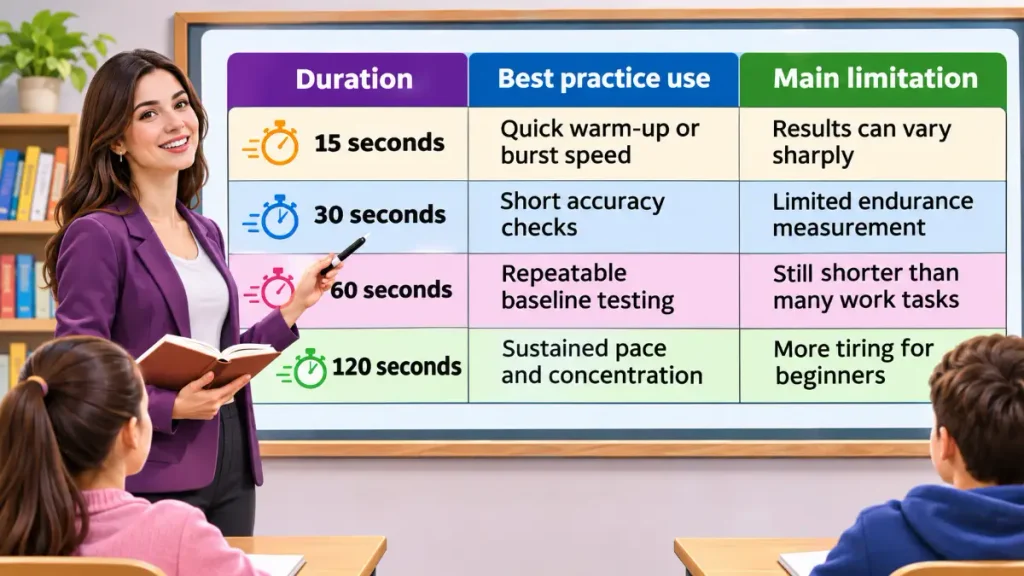
All four durations appear on Tiping.com’s homepage. For meaningful progress tracking, choose one as your regular benchmark and use the others for variety. A one-minute test is a practical starting point for most users.
Is Tiping Com Free?
The official website presents its main typing test as free. Its typing-games page states that the listed games require no registration, download, or in-app purchase. The games run in the browser, according to that page.
This does not establish that every possible future feature will remain free. Website policies can change, so read any new payment or account prompt carefully. No paid subscription was verified during this research, and this article does not invent one.
Is Tiping Com Safe and Legitimate?
Tiping.com is an identifiable, accessible website with official pages describing its tools and learning resources. That supports the conclusion that it operates as a typing-practice site, but no website can be guaranteed completely safe from a review of public pages alone.
Website Identity and Transparency
The homepage describes TIPING as an independent browser typing platform and explicitly says it is not affiliated with another typing website. Its footer displays About, Contact, Privacy, Terms, and Cookies links. These are useful transparency signals, although a link’s presence does not independently validate every policy claim or identify the site’s legal owner.
Privacy and Local Storage
Tiping.com’s homepage says test history stays on the user’s device. Its FAQ says it stores WPM, accuracy, and date locally and does not send the actual text typed to a server. The games page likewise says game progress is stored locally.
These are website statements, not the result of a full technical audit of network traffic or browser storage. Users should avoid entering passwords, financial details, or confidential documents into any public typing tool, even when a service describes itself as private.
Advertising and Third Parties
A third-party domain-analysis report published in October 2026 identified one tracking script and reported a valid HTTPS certificate during its check. Such a snapshot can change and does not reveal every data-handling practice. HTTPS encrypts connections but does not prove that a website’s content, operator, or policies are trustworthy.
For a fuller privacy assessment, review the site’s current Privacy and Cookies pages directly. Check whether any third-party services are disclosed and whether browser permissions seem reasonable for a typing test.
Practical Precautions
- Confirm that the address bar shows the intended domain.
- Do not paste sensitive workplace or personal information into a test.
- Keep your browser updated and decline unrelated permission requests.
- Remember that clearing site data may remove locally saved results.
- Treat automated security ratings as limited signals, not final verdicts.
Tiping Com vs Typing Com
Tiping.com and Typing.com are separate platforms, despite their similar names. This distinction is especially important because some third-party articles incorrectly suggest that the shorter spelling is only a typo and that no independent Tiping.com service exists.
Tiping.com is centered on quick tests, challenges, games, and personal statistics. Typing.com’s official support material describes a wider educational service with structured lessons, a Teacher Portal, digital citizenship, coding, and other classroom subjects.
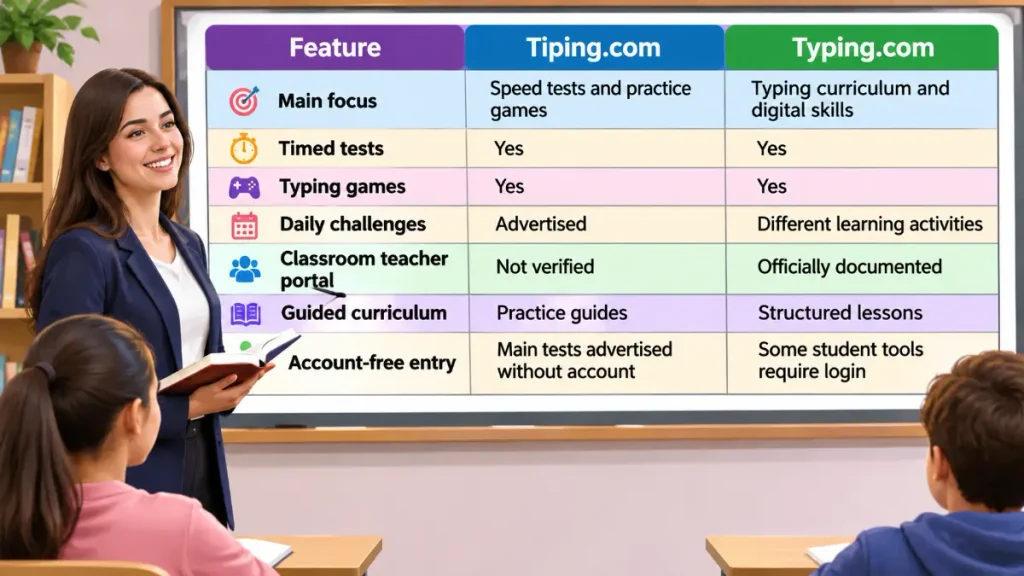
Typing.com also describes free and PLUS editions, while Tiping.com’s games page says its listed games are free without registration. Neither platform should be assumed to share ownership, accounts, lesson plans, or privacy practices.
Which Should You Choose?
Choose Tiping.com when you want a quick WPM test, a daily practice habit, or game-based challenges. Choose Typing.com when you need a formal lesson sequence, teacher oversight, or broader digital-literacy instruction. Both can serve different needs without being interchangeable.
Typing Games Versus Traditional Practice
Games can help maintain motivation. Racing an AI bot or clearing incoming words creates a reason to practice repeatedly, especially for someone who finds ordinary drills boring.
Traditional tests offer a more controlled way to compare results. They are often better for measuring consistent speed and accuracy, particularly when the text resembles school or office work. A balanced routine uses games for engagement and timed passages for measurement.
Do not judge your ability by game scores alone. Game difficulty, bonuses, and unusual word sequences may produce results that do not translate directly to real typing tasks.
A Seven-Day Beginner Practice Plan
This plan uses tools described on Tiping.com’s official pages. Spend about ten minutes each day and adjust the difficulty to your comfort level.
- Day 1: Complete a 60-second test and record WPM and accuracy.
- Day 2: Use weak-key practice or its diagnostic drill.
- Day 3: Complete the daily challenge at a controlled pace.
- Day 4: Try TIPING Race on Easy, then repeat a standard test.
- Day 5: Practice weak keys and add punctuation if comfortable.
- Day 6: Play Word Survival, then practice ordinary sentences.
- Day 7: Repeat the original 60-second test and compare results.
Focus on trends rather than a single unusually good or bad session. If accuracy falls as speed rises, slow down for the next few practices. Progress depends on your starting skill, regularity, keyboard familiarity, and the type of text you practice.
Common Problems and Possible Solutions
The following are general troubleshooting suggestions, not confirmed reports of widespread Tiping.com defects.
The Test Does Not Start
Click or tap the typing input area and try again. Refresh the page if it does not respond, then check whether a browser extension is interfering with keyboard input.
Keyboard Input Is Not Recognized
Confirm that the correct window and input field have focus. Test your keyboard in another application to distinguish a website issue from a hardware or layout problem.
Saved Progress Is Missing
Because the website says results are stored locally, switching devices or browsers may produce a different history. Clearing browser data or using a private window may also prevent earlier results from appearing.
The Website Looks Different on Mobile
Tiping.com’s FAQ says the test supports a phone’s native keyboard and adjusts the layout. For job-test preparation, a physical keyboard may still give you more relevant practice than a touchscreen.
Advantages and Limitations
The main advantage is quick, account-free access to typing practice. The range of tests and games makes it possible to alternate between measurement, targeted drills, and lighter challenges. Local progress storage may also appeal to users who prefer not to create an account.
The main limitation is that local data may not follow you to another device. The website’s self-described privacy practices were not independently audited here, and its full statistics interface was not available to the research tool. Finally, its practice-focused format is not a substitute for a structured typing curriculum or an employer’s official assessment.
Is Tiping Com Worth Using?
For someone who wants to measure speed and practice regularly, Tiping.com is a reasonable option to try. Its official pages identify clear features, including timed tests, a daily challenge, games, ghost races, and weak-key drills. The free, browser-based approach reduces the effort required to begin.
Use it as a practice tool rather than a certification service. Keep a separate record if your results matter, and compare tests under similar conditions. If you are learning touch typing from the beginning, consider combining its practice activities with a structured instructional program.
Frequently Asked Questions About Tiping Com
What is Tiping Com used for?
Tiping.com measures typing speed and accuracy and offers games and practice drills. It runs in a web browser.
Is Tiping Com free?
The website describes its typing tests and games as free. Its games page says no registration or purchase is needed.
Is Tiping Com the same as Typing.com?
No, they are different websites. Tiping.com focuses on tests and games, while Typing.com offers structured lessons and classroom tools.
Can beginners use Tiping Com?
Yes, beginners can start with short tests and accuracy practice. A structured course may help with finger placement.
Does Tiping Com measure typing accuracy?
Yes, the homepage says its tests measure accuracy alongside WPM and consistency. Accuracy helps show how often you type correctly.
Can I use Tiping Com on my phone?
The website says its typing test supports a phone’s native keyboard. A physical keyboard is preferable for desktop typing practice.
Does Tiping Com save typing results?
The website says results are stored locally on your device. Clearing site data or changing devices may affect access to them.
What is a good typing speed in WPM?
Around 40 WPM is a practical everyday benchmark cited by Tiping.com. Your ideal target depends on accuracy and the task.
Final Thoughts
Tiping.com is a browser-based typing practice site with a clear emphasis on quick speed tests, accuracy measurement, and engaging games. Its official pages describe daily challenges, ghost races, weak-key drills, and locally stored progress, all of which can support a regular practice routine.
The most important distinction is that Tiping.com is not Typing.com. Use the former for quick testing and practice games, and consider the latter when you need guided lessons or classroom features. Whichever tool you choose, track accuracy as carefully as speed and compare results under consistent conditions. Treat the site’s privacy descriptions as published claims rather than independent guarantees, and avoid entering sensitive text into public typing tools.

Sophia Bennett writes educational content about English vocabulary, grammar, slang, and communication. She is passionate about making complex language topics accessible to students, professionals, and curious readers around the world.


One Comment